


PetOne Vet
4.7216.00 Reviews
App Specs
- Version
- 3.1.5
- Updated On
- License
- Free
- Downloads
- 50,000+
- Developer
- National Veterinary Associates
- Categories
- Medical
- Platform
- Android
Screenshots
 Analysis by AppCompare
When I first open a pet-care app, I want to know what it will actually help me do, not just see a polished dashboard. PetOne Vet is aimed at the practical side of looking after an animal: keeping important care details, appointments, and reminders easier to find. I’d treat it as an organizer for the routine parts of veterinary care, rather than a replacement for a vet’s advice or a tool for diagnosing a problem.
What to expect from a veterinary-care app
PetOne Vet is a free medical app from National Veterinary Associates. It has a 4.6 average from around 860 ratings, and more than 50,000 installs. Its current version is 3.1.2, it is rated for Everyone, and it runs on Android 7.0 or later. Those details make it approachable for many households, but the useful question is whether the app fits the way you already manage your pet’s care.
My view is that an app like this is most helpful when it reduces small, repeated bits of mental bookkeeping. Remembering when a vaccination is due, locating a note before an appointment, or keeping details for more than one pet in order can otherwise mean checking messages, paper records, and a calendar separately. The benefit is not that every task becomes effortless; it is that the information you choose to enter has a more consistent home.
That distinction matters if you are expecting the app to make veterinary decisions for you. A reminder can prompt you to contact a clinic, and a saved record can help you explain a pet’s history, but neither tells you whether a symptom is harmless. When something seems urgent or worrying, I would contact a veterinary professional rather than wait for an app to guide me.
Getting started and making the app useful
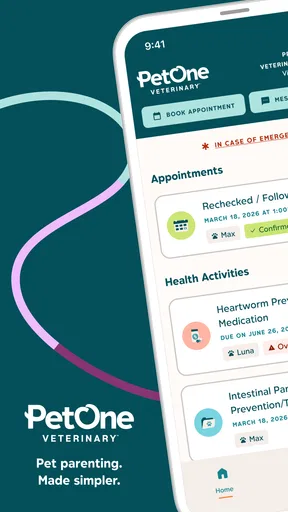
Downloading PetOne Vet was quick and painless. It’s available for both Android and iOS, and after a speedy install, I was ready to dive in. The app's interface is super intuitive—no steep learning curve here. The home screen greets you with a dashboard that gives you a quick overview of your pet's health status, upcoming appointments, and alerts for vaccinations or medications. It’s like having a personal assistant for your pet!
Set up only the details you can rely on
Setting up your pet’s profile is straightforward. You just fill in details like their name, breed, age, and any medical history you might have on hand. What’s cool is the app’s ability to handle multiple pets, so if you’re a multi-pet household, you’re covered. I found the customization options pretty neat—you can even add a cute photo of your pet, which makes the whole experience a bit more personal.
For a first-time user, I’d start with the details that help you distinguish one animal from another and make an upcoming visit easier: the pet’s name, a clear photo, and any medical information you already know to be accurate. If you are unsure of a date or dose, don’t guess just to fill a blank. Check the paperwork or ask the clinic, then add the detail. A tidy profile is only useful when it is trustworthy.
Worth Reading Before You Choose

EA SPORTS FC Mobile 26 Is a Bigger Football Game, but It Takes Time

Flipboard Shows What News Apps Must Do Beyond the Feed

Switching to Android Auto Means Rethinking Your Driving Routine

Google Calendar Makes a Crowded Week Easier to Manage

Ludo King Makes the Most of the Minutes Between Plans

Baby Panda World Brings Quick Play to Modern Phones, but Its Game Library Feels Busy
In a home with several pets, the small habit of checking the profile name before adding a note or reminder can prevent a surprisingly common mix-up. A vaccination date or medication reminder attached to the wrong animal may look organized while still being misleading. I’d take a moment to review each profile after setup, especially if the pets have similar names or care routines.
Turn the appointment calendar into a useful routine
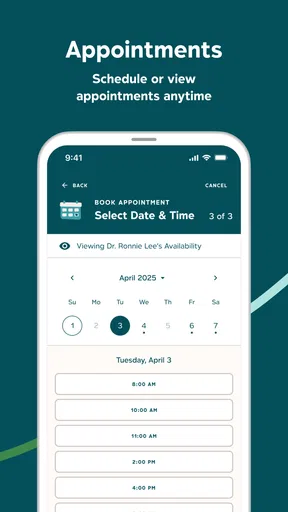
One of the standout features is the appointment management. You can easily book, reschedule, or cancel appointments with your vet directly through the app. The calendar sync feature is a lifesaver, sending you reminders so you never miss an appointment. I tested this out by booking a mock appointment, and it worked like a charm. Plus, there’s a notes section for jotting down any questions you might want to ask your vet.
The notes section is particularly useful when a concern is easy to forget in the exam room. I’d add short, concrete prompts before the visit—when a change began, what you observed, and what you want clarified—rather than trying to write a full history while distracted. After the appointment, a brief note about the vet’s instructions can help you remember what to follow up on. For complicated treatment directions, though, I would rely on the clinic’s written guidance and confirm anything unclear.
A practical first success is to enter the next confirmed appointment and then check that the date and time appear as expected. That gives you a chance to learn where the appointment information lives before you depend on a reminder. If you usually use a separate phone calendar, keep using it until you are comfortable with how the app’s reminders fit your routine; having a backup is sensible for an important visit.
Keep records useful without turning setup into a project
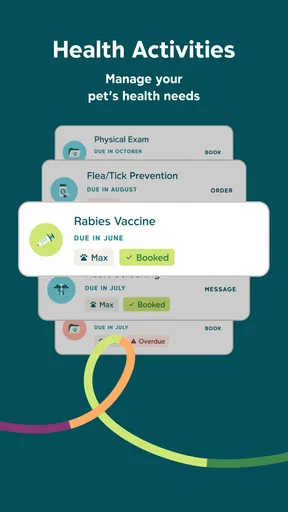
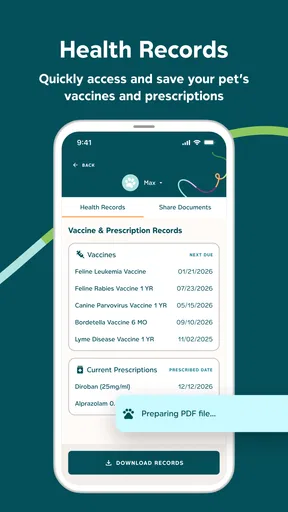
Keeping track of your pet’s medical records can be a hassle, but PetOne Vet simplifies this with its digital health records section. You can upload documents, track vaccinations, and manage medication schedules all in one place. The app sends timely reminders for upcoming vaccinations, which is great for forgetful folks like me. It’s like having a personal vet secretary in your pocket.
I would not try to digitize every old document on the first evening. Start with the records you are most likely to need soon, such as information relevant to an upcoming appointment, and add older paperwork when there is a reason to look it up. This staged approach makes the app useful sooner and lowers the chance that setup feels like a chore. Keeping original documents is still worthwhile, particularly when a clinic asks for a specific record or you need to verify a detail.
For medication reminders, make sure the schedule you enter matches the instructions from your veterinary professional. A reminder helps you follow a plan; it does not decide whether a medicine should be started, stopped, or changed. If your pet’s directions change, update your own notes and the app so an old alert does not continue to mislead you.
Prepare emergency information, but keep perspective
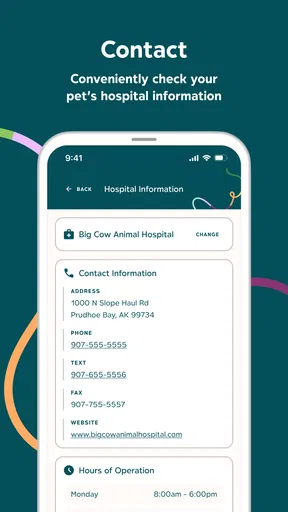
Another noteworthy feature is the emergency contacts section. You can store your vet’s contact details, along with nearby emergency clinics, which can be a real lifesaver in urgent situations. The app also provides a quick guide on what to do in common pet emergencies. It’s reassuring to know that help is just a tap away if you ever need it.
I’d set up emergency contacts while calm, not while trying to respond to a crisis. Check that the clinic details are current, and think through which nearby service you would contact outside your usual vet’s hours. The app’s guide can be a useful prompt, but it should not delay a call when your pet needs urgent attention. This is one area where preparation matters more than exploring every screen.
If you are away from home, having the essential contact information and care notes in one place may make it easier to brief another caregiver. Before handing over responsibility, I’d still explain the routine directly and point out any important instructions; an app is a helpful reference, not a substitute for clear communication.
How it fits beside other ways of organizing care
The overall design of PetOne Vet is sleek and user-friendly. Everything is easy to navigate, and I didn’t encounter any bugs or crashes during my testing. The color scheme is soothing, which makes spending time on the app a pleasant experience. They’ve definitely nailed the user experience aspect.
Compared with a paper folder, a phone calendar, or scattered clinic messages, a dedicated pet-care app has the advantage of bringing several kinds of information into a pet-focused space. That can be especially handy for people who manage appointments and reminders for multiple animals. The trade-off is that it only helps with information you keep current. Someone who already has a reliable calendar system and rarely needs to consult records may not gain enough to justify maintaining another place.
It is also different from contacting a clinic directly. If you need to confirm whether a clinic has received a record, ask about a symptom, or clarify an appointment, speaking with the veterinary team is the better route. I see the app as a way to prepare for those conversations and remember the routine around them, not as a replacement for the relationship with your vet.
Where the experience could be stronger
While PetOne Vet offers a lot, there's always room for improvement. I’d love to see an integration with pet food delivery services or a feature that offers personalized pet care tips based on your pet’s profile. A community feature where you can connect with other pet owners for advice and support would also be a nice touch.
There is a broader trade-off behind any digital record system: you need to make a habit of updating it. If you forget to enter a new appointment, change a medication reminder after instructions change, or leave a profile incomplete, the dashboard can give a false sense of order. I’d treat it as a practical aid that works best with occasional check-ins, rather than assuming it will manage everything automatically.
It may not be the right fit for someone who wants medical advice from an app, prefers not to keep care information on a phone, or already has a simple system that never lets them miss important tasks. In those cases, the usual clinic phone call, paper record, or existing calendar may be enough. The app makes more sense when scattered pet-care details are already costing you time or causing avoidable uncertainty.
Who is most likely to benefit
I’d recommend trying it if you are new to pet ownership and want a clear place to begin, if more than one person helps care for your pet, or if you manage several animals with different appointments and records. It can also suit anyone who tends to remember a question only after leaving the clinic. A quick note saved ahead of the visit is a simple change that can make the appointment more focused.
Picture a regular weekday: you notice that your dog’s next checkup is coming up, but you cannot remember whether you wrote down a question about a recent change in routine. You open the pet’s profile, check the appointment details, and add the question to your notes before the visit. That is the sort of ordinary, low-pressure task where an organizer can prove its value. It does not solve the health concern, but it helps you show up prepared to discuss it.
For a first session, I’d aim for one meaningful result rather than a perfect archive: create the profile, add one reliable care detail, and record the next appointment or question you need to remember. Then revisit the app after the visit and add the information you actually found useful. This keeps the process reassuring and lets your real routine—not a long checklist—show you what to set up next.
My take after trying it
All in all, PetOne Vet is a handy tool for pet owners. It streamlines pet care, making it easier to stay organized and ensure your furry friends are getting the best care possible. While there are a few features I’d love to see in future updates, the app is already a fantastic resource for managing pet health. It’s definitely worth checking out if you want to take some of the stress out of pet parenting.
So, if you're ready to step up your pet care game, give PetOne Vet a try. It might just become your new favorite app!
Pros
- User-friendly interface for easy navigation.
- Comprehensive pet health tracking features.
- Reminders for vaccinations and check-ups.
- Customizable profiles for multiple pets.
- Secure data storage with cloud backup.
Cons
- Limited customer support options available.
- Some features require a premium subscription.
- Occasional syncing issues with devices.
- Language support is limited to English only.
- Initial setup can be time-consuming.
FAQs for PetOne Vet
What is PetOne Vet and what features does it offer?
PetOne Vet is a comprehensive app designed to assist pet owners in managing their pets' health and wellness. It offers features such as appointment scheduling with veterinarians, vaccination reminders, health record storage, and a community forum for pet owners to share advice and experiences. The app also provides access to a database of pet care articles and tips.
Is PetOne Vet available for both Android and iOS devices?
Yes, PetOne Vet is available for download on both Android and iOS platforms. You can find it on the Google Play Store for Android devices and the Apple App Store for iOS devices. Ensure your device meets the system requirements for optimal performance before downloading.
How does PetOne Vet ensure the security of my pet’s health data?
PetOne Vet takes data security seriously and uses encryption to protect your pet's health records. The app complies with privacy regulations and ensures that your information is stored securely. Users are encouraged to regularly update the app to benefit from the latest security enhancements.
Can I use PetOne Vet to connect with my current veterinarian?
PetOne Vet allows users to connect with a network of participating veterinarians. If your current vet is part of this network, you can easily schedule appointments and consult with them through the app. If not, you can invite them to join or use the app to find other qualified vets in your area.
Are there any subscription fees or in-app purchases in PetOne Vet?
PetOne Vet offers a free version with basic features, but a premium subscription is available for users who want access to additional features such as advanced health analytics, personalized pet care advice, and ad-free usage. In-app purchases may also be available for certain functionalities or content.


